Adding Depth - Z axis Demo 14
Objective
Do the same stuff as the previous demo, but use 3D coordinates, where the negative z axis goes into the screen (because of the right hand rule). Positive z comes out of the monitor towards your face.
Things that this demo doesn’t end up doing correctly:
The blue square is always drawn, even when its z-coordinate in world space is less than the paddle’s. The solution will be z-buffering https://en.wikipedia.org/wiki/Z-buffering, and it is implemented in the next demo.
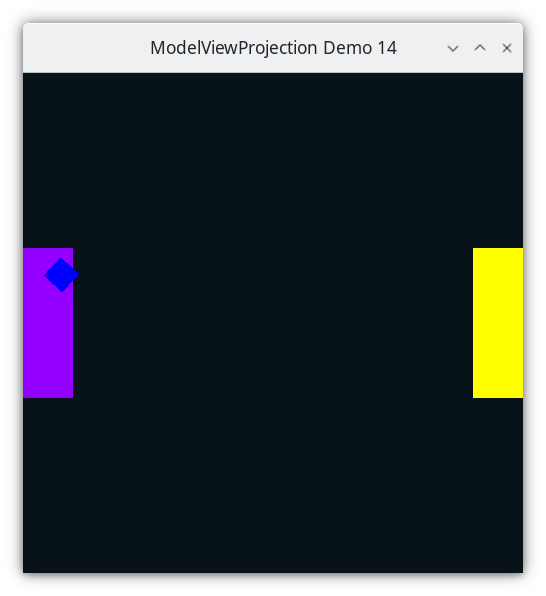
Demo 14
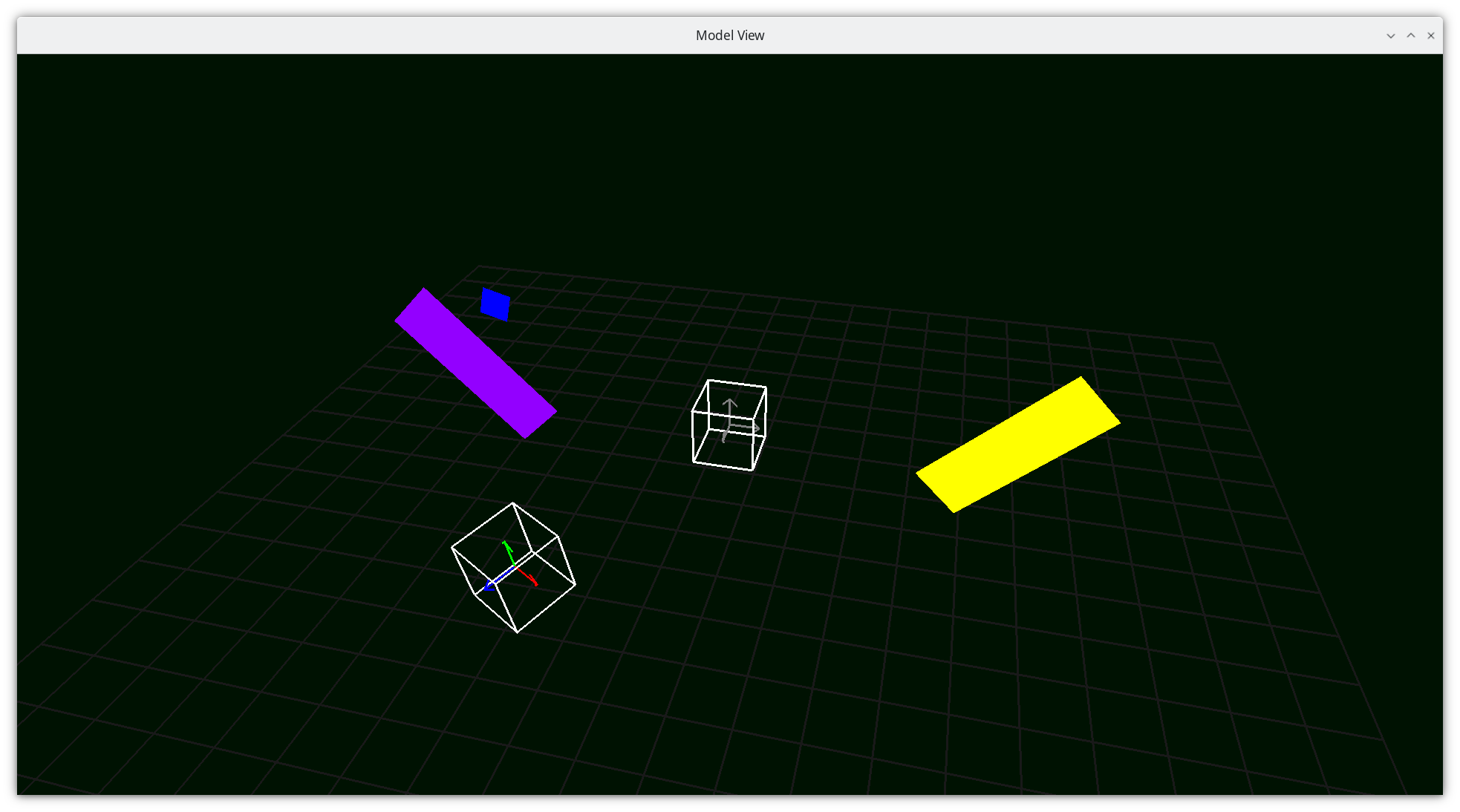
Camera Space
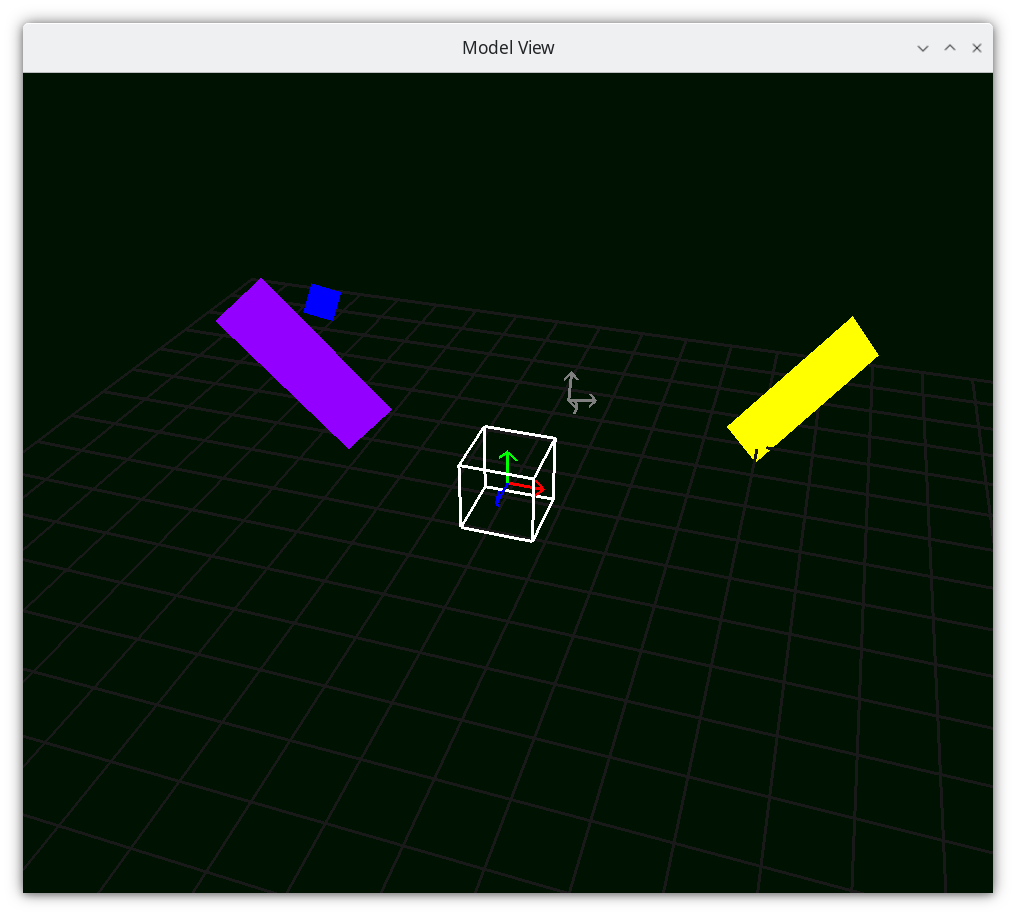
Camera Space
How to Execute
Load src/modelviewprojection/demo14.py in Spyder and hit the play button.
Move the Paddles using the Keyboard
Keyboard Input |
Action |
|---|---|
w |
Move Left Paddle Up |
s |
Move Left Paddle Down |
k |
Move Right Paddle Down |
i |
Move Right Paddle Up |
d |
Increase Left Paddle’s Rotation |
a |
Decrease Left Paddle’s Rotation |
l |
Increase Right Paddle’s Rotation |
j |
Decrease Right Paddle’s Rotation |
UP |
Move the camera up, moving the objects down |
DOWN |
Move the camera down, moving the objects up |
LEFT |
Move the camera left, moving the objects right |
RIGHT |
Move the camera right, moving the objects left |
q |
Rotate the square around its center |
e |
Rotate the square around paddle 1’s center |
Description
Vector data will now have an X, Y, and Z component.
Rotations around an angle in 3D space follow the right hand rule. Here’s a link to them in matrix form, which we have not yet covered.
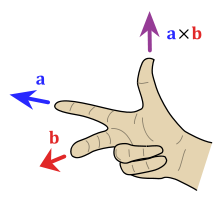
With open palm, fingers on the x axis, rotating the fingers to y axis, means that the positive z axis is in the direction of the thumb. Positive Theta moves in the direction that your fingers did.
starting on the y axis, rotating to z axis, thumb is on the positive x axis.
starting on the z axis, rotating to x axis, thumb is on the positive y axis.
557@dataclasses.dataclass
558class Vector1D(Vector):
559    x: float  #: The value of the 1D Vector
Rotate Z
Rotate Z is the same rotate that we’ve used so far, but doesn’t affect the z component at all.

761def rotate_z(angle_in_radians: float) -> InvertibleFunction:
762    def create_rotate_function(r) -> typing.Callable[[Vector], Vector]:
763        def f(vector: Vector) -> Vector:
764            assert isinstance(vector, Vector3D)
765            xy_on_xy: Vector = Vector2D(x=vector.x, y=vector.y)
766            rotated_xy_on_xy: Vector = r(xy_on_xy)
767            assert isinstance(rotated_xy_on_xy, Vector2D)
768            return Vector3D(
769                x=rotated_xy_on_xy.x, y=rotated_xy_on_xy.y, z=vector.z
770            )
771
772        return f
773
774    r: InvertibleFunction = rotate(angle_in_radians)
775    return InvertibleFunction(
776        create_rotate_function(r),
777        create_rotate_function(inverse(r)),
778        f"RZ_{{<{angle_in_radians}>}}",
779        f"RZ_{{<{-angle_in_radians}>}}",
780    )
Rotate X

714def rotate_x(angle_in_radians: float) -> InvertibleFunction:
715    def create_rotate_function(r) -> typing.Callable[[Vector], Vector]:
716        def f(vector: Vector) -> Vector:
717            assert isinstance(vector, Vector3D)
718            yz_on_xy: Vector = Vector2D(x=vector.y, y=vector.z)
719            rotated_yz_on_xy: Vector = r(yz_on_xy)
720            return Vector3D(
721                x=vector.x, y=rotated_yz_on_xy.x, z=rotated_yz_on_xy.y
722            )
723
724        return f
725
726    r = rotate(angle_in_radians)
727    return InvertibleFunction(
728        create_rotate_function(r),
729        create_rotate_function(inverse(r)),
730        f"RX_{{<{angle_in_radians}>}}",
731        f"RX_{{<{-angle_in_radians}>}}",
732    )
Rotate Y

737def rotate_y(angle_in_radians: float) -> InvertibleFunction:
738    def create_rotate_function(r) -> typing.Callable[[Vector], Vector]:
739        def f(vector: Vector) -> Vector:
740            assert isinstance(vector, Vector3D)
741            zx_on_xy: Vector = Vector2D(x=vector.z, y=vector.x)
742            rotated_zx_on_xy: Vector = r(zx_on_xy)
743            assert isinstance(rotated_zx_on_xy, Vector2D)
744            return Vector3D(
745                x=rotated_zx_on_xy.y, y=vector.y, z=rotated_zx_on_xy.x
746            )
747
748        return f
749
750    r = rotate(angle_in_radians)
751    return InvertibleFunction(
752        create_rotate_function(r),
753        create_rotate_function(inverse(r)),
754        f"RY_{{<{angle_in_radians}>}}",
755        f"RY_{{<{-angle_in_radians}>}}",
756    )
Scale
540def uniform_scale(m: float) -> InvertibleFunction:
541    def f(vector: Vector) -> Vector:
542        return vector * m
543
544    def f_inv(vector: Vector) -> Vector:
545        if m == 0.0:
546            raise ValueError("Not invertible.  Scaling factor cannot be zero.")
547
548        return vector * (1.0 / m)
549
550    tex_str: str = f"S_{{{m}}}"
551    inv_str: str = f"S_{{{-m}}}"
552    return InvertibleFunction(f, f_inv, tex_str, inv_str)
Code
The only new aspect of the code below is that the paddles have a z-coordinate of 0 in their modelspace.
 94paddle1: Paddle = Paddle(
 95    vertices=[
 96        mu3d.Vector3D(x=-1.0, y=-3.0, z=0.0),
 97        mu3d.Vector3D(x=1.0, y=-3.0, z=0.0),
 98        mu3d.Vector3D(x=1.0, y=3.0, z=0.0),
 99        mu3d.Vector3D(x=-1.0, y=3.0, z=0.0),
100    ],
101    color=colorutils.Color3(r=0.578123, g=0.0, b=1.0),
102    position=mu3d.Vector3D(x=-9.0, y=0.0, z=0.0),
103)
104
105paddle2: Paddle = Paddle(
106    vertices=[
107        mu3d.Vector3D(x=-1.0, y=-3.0, z=0.0),
108        mu3d.Vector3D(x=1.0, y=-3.0, z=0.0),
109        mu3d.Vector3D(x=1.0, y=3.0, z=0.0),
110        mu3d.Vector3D(x=-1.0, y=3.0, z=0.0),
111    ],
112    color=colorutils.Color3(r=1.0, g=1.0, b=0.0),
113    position=mu3d.Vector3D(x=9.0, y=0.0, z=0.0),
114)
The only new aspect of the square below is that the paddles have a z-coordinate of 0 in their modelspace. N.B that since we do a sequence transformations to the modelspace data to get to world-space coordinates, the X, Y, and Z coordinates are subject to be different.
119@dataclasses.dataclass
120class Camera:
121    position_ws: mu3d.Vector3D = dataclasses.field(
122        default_factory=lambda: mu3d.Vector3D(x=0.0, y=0.0, z=0.0)
123    )
124
125
126camera: Camera = Camera()
The camera now has a z-coordinate of 0 also.
130square: list[mu3d.Vector3D] = [
131    mu3d.Vector3D(x=-0.5, y=-0.5, z=0.0),
132    mu3d.Vector3D(x=0.5, y=-0.5, z=0.0),
133    mu3d.Vector3D(x=0.5, y=0.5, z=0.0),
134    mu3d.Vector3D(x=-0.5, y=0.5, z=0.0),
135]
Event Loop
188while not glfw.window_should_close(window):
...
Draw Paddle 1
208    GL.glColor3f(*iter(paddle1.color))
209    GL.glBegin(GL.GL_QUADS)
210    for p1_v_ms in paddle1.vertices:
211        ms_to_ndc: mu3d.InvertibleFunction = mu3d.compose(
212            [
213                # camera space to NDC
214                mu3d.uniform_scale(1.0 / 10.0),
215                # world space to camera space
216                mu3d.inverse(mu3d.translate(camera.position_ws)),
217                # model space to world space
218                mu3d.compose(
219                    [
220                        mu3d.translate(paddle1.position),
221                        mu3d.rotate_z(paddle1.rotation),
222                    ]
223                ),
224            ]
225        )
226
227        paddle1_vector_ndc: mu3d.Vector3D = ms_to_ndc(p1_v_ms)
228        GL.glVertex3f(
229            paddle1_vector_ndc.x, paddle1_vector_ndc.y, paddle1_vector_ndc.z
230        )
231    GL.glEnd()
The square should not be visible when hidden behind the paddle1, as we do a translate by -1. But in running the demo, you see that the square is always drawn over the paddle.
Draw the Square
235    # draw square
236    GL.glColor3f(0.0, 0.0, 1.0)
237    GL.glBegin(GL.GL_QUADS)
238    for ms in square:
239        ms_to_ndc: mu3d.InvertibleFunction = mu3d.compose(
240            [
241                # camera space to NDC
242                mu3d.uniform_scale(1.0 / 10.0),
243                # world space to camera space
244                mu3d.inverse(mu3d.translate(camera.position_ws)),
245                # model space to world space
246                mu3d.compose(
247                    [
248                        mu3d.translate(paddle1.position),
249                        mu3d.rotate_z(paddle1.rotation),
250                    ]
251                ),
252                # square space to paddle 1 space
253                mu3d.compose(
254                    [
255                        mu3d.translate(mu3d.Vector3D(x=0.0, y=0.0, z=-1.0)),
256                        mu3d.rotate_z(rotation_around_paddle1),
257                        mu3d.translate(mu3d.Vector3D(x=2.0, y=0.0, z=0.0)),
258                        mu3d.rotate_z(square_rotation),
259                    ]
260                ),
261            ]
262        )
263        square_vector_ndc: mu3d.Vector3D = ms_to_ndc(ms)
264        GL.glVertex3f(
265            square_vector_ndc.x, square_vector_ndc.y, square_vector_ndc.z
266        )
267    GL.glEnd()
This is because without depth buffering, the object drawn last clobbers the color of any previously drawn object at the pixel. Try moving the square drawing code to the beginning, and you will see that the square can be hidden behind the paddle.
Draw Paddle 2
271    # draw paddle 2
272    GL.glColor3f(*iter(paddle2.color))
273    GL.glBegin(GL.GL_QUADS)
274    for p2_v_ms in paddle2.vertices:
275        ms_to_ndc: mu3d.InvertibleFunction = mu3d.compose(
276            [
277                # camera space to NDC
278                mu3d.uniform_scale(1.0 / 10.0),
279                # world space to camera space
280                mu3d.inverse(mu3d.translate(camera.position_ws)),
281                # model space to world space
282                mu3d.compose(
283                    [
284                        mu3d.translate(paddle2.position),
285                        mu3d.rotate_z(paddle2.rotation),
286                    ]
287                ),
288            ]
289        )
290
291        paddle2_vector_ndc: mu3d.Vector3D = ms_to_ndc(p2_v_ms)
292        GL.glVertex3f(
293            paddle2_vector_ndc.x, paddle2_vector_ndc.y, paddle2_vector_ndc.z
294        )
295    GL.glEnd()
Added translate in 3D. Added scale in 3D. These are just like the 2D versions, just with the same process applied to the z axis.
They direction of the rotation is defined by the right hand rule.